Pixy
App-Icon von PixyvsApp-Icon von Pixels
Alternative zu Pixels

Pixy vs. Pixels: Year in Pixels auf iPhone und Android

Pixels hat das Year in Pixels auf Android bekannt gemacht. Pixy bringt dieselbe Idee auf iPhone und Android, ohne Werbung und mit offenem Quellcode.


Zuletzt geprüft am . Angaben aus den US-Einträgen im App Store und bei Google Play. Angaben zu Pixy aus dem Quellcode der App.

  • 4,9App Store
  • 4,7Google Play
Homescreen-Widget
iPhone-Widgets: 4 Wochen, Monat, Jahr
Pixels: Nicht im Store-Eintrag
App-Sperre
Sperre mit Face ID oder „Privater Bereich“
Pixels: Nicht im Store-Eintrag
Fotos
Pixels hat das
Pixy: Nein

Direkter Vergleich

Pixy vs. Pixels auf einen Blick

Wie Pixy und Pixels bei Funktionen, Plattformen und Datenschutz abschneiden, basierend auf den öffentlichen Store-Einträgen.

Geprüft am 29. September 2026. Angaben zu Pixels stammen aus den US-Einträgen im App Store und bei Google Play; „Nicht im Store-Eintrag“ bedeutet, dass Pixels die Funktion nicht bewirbt. Angaben zu Pixy stammen aus dem Quellcode der App. Bewertungen und Preise stammen aus den US-Stores.
KategoriePixyPixels
Year-in-Pixels-KalenderJeder Tag ist ein farbiges QuadratJa, laut Store-Eintrag
Eigene TagsDeine eigenen Aktivitäten, Personen, OrteJa, laut Store-Eintrag
NotizenNotiz zu jedem EintragJa, laut Store-Eintrag
StimmungsstatistikenWöchentlich, monatlich und jährlichJa, laut Store-Eintrag
ErinnerungenTägliche Erinnerung zum EintragenJa, laut Store-Eintrag
DatenexportJSON oder CSV exportieren, JSON wieder importierenJa, laut Store-Eintrag
Homescreen-WidgetiPhone-Widgets: 4 Wochen, Monat, JahrNicht im Store-Eintrag
App-SperreSperre mit Face ID oder „Privater Bereich“Nicht im Store-Eintrag
Daten bleiben auf deinem HandyAuf deinem Handy, ohne KontoNicht im Store-Eintrag
FotosNeinJa, laut Store-Eintrag
Automatisches BackupNeinJa, laut Store-Eintrag
PlattformeniPhone und AndroidNur Android
PreisGoogle Play (USA)Kostenlos. Kein Abo, keine Werbung.In-App-Käufe $1.49 - $21.99 per item
WerbungKeine WerbungZeigt Werbung
Open SourceJa, MIT-LizenzClosed Source
App-Store-BewertungApp Store (USA), geprüft am 29. September 20264,87 ★ (135)Nicht im App Store
Google-Play-BewertungGoogle Play (USA), geprüft am 29. September 20264,68 ★ (569)4,58 ★ (24.365)
Wann Pixels besser passt
  • Du willst Fotos zu Einträgen hinzufügen.
  • Du willst automatische Backups außerhalb des Handys.
Wann Pixy besser passt
  • Du willst deine Pixel als Widget auf dem Homescreen deines iPhones.
  • Du willst Pixy mit Face ID oder im „Privaten Bereich“ von Android sperren.
  • Du willst kein Konto, und deine Einträge bleiben auf dem Handy.
  • Du wechselst zwischen iPhone und Android.

Ist Pixy kostenlos?

Ja. Pixy ist auf iPhone und Android kostenlos, ohne Abo, ohne Werbung und ohne Konto. Der Quellcode ist öffentlich, unter MIT-Lizenz.

Warum Pixy

Warum Leute von Pixels zu Pixy wechseln

Pixy macht eine Sache gut: Es hilft dir zu bemerken, wie sich deine Tage anfühlen. Schnell ausgefüllt, leicht zu lesen und standardmäßig privat.

Dein Year in Pixels
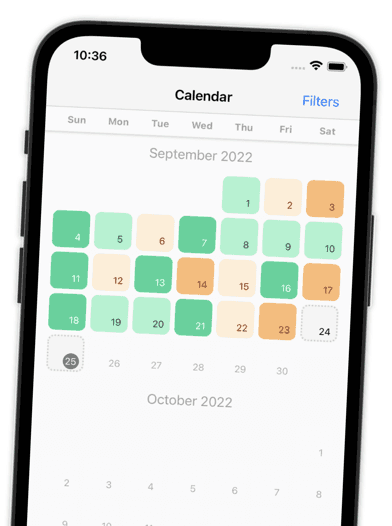
Jeder Tag wird zu einem farbigen Quadrat. Ein ganzes Jahr voller Stimmungen passt auf einen Bildschirm, so springen Muster sofort ins Auge.
Ein Tag in Sekunden erfasst
Farbe wählen, fertig. Emotionen, Personen, Tags oder eine Notiz fügst du nur hinzu, wenn du willst. Du bestimmst, welche Schritte erscheinen.
Benenne, was du fühlst
Wähle aus einer langen Liste von Emotionen, jede mit einer kurzen Beschreibung. Leg pro Tag so viele Einträge an, wie du willst.
Sieh, mit wem du deine Tage verbringst
Füge einem Eintrag die Menschen hinzu, mit denen du zusammen warst. Wähle sie aus einem Raster mit Gesichtern aus oder importiere sie aus deinen Kontakten.
Muster, mit denen du etwas anfangen kannst
Jeder Check-in endet mit einer Zusammenfassung deines Tages und deiner Woche in Pixeln. Monats- und Jahresberichte zeigen, wann deine Stimmung ihre Hochs hat und welche Tags am häufigsten vorkommen.
Eine ruhige Minute, wenn du sie brauchst
Fühlst du dich ängstlich? Nach deinem Check-in bietet dir Pixy kurze angeleitete Übungen an: langsames Atmen, einen Sorgen-Check oder einen Body-Scan.
Deine Pixel auf dem Homescreen
iPhone-Widgets zeigen deine letzten 4 Wochen, diesen Monat oder dein ganzes Jahr. Wähle deine Stimmungsfarben und eins von 9 App-Icons.
Standardmäßig privat
Kein Konto, keine Registrierung. Deine Einträge bleiben auf deinem Handy. Exportiere jederzeit als JSON oder CSV oder lösche deine Daten.
Open Source, ohne Werbung
Der Code ist öffentlich auf GitHub unter der MIT-Lizenz, also kann ihn jeder prüfen. Und nichts unterbricht dich: Pixy zeigt keine Werbung.

Bewertungen

Beliebt bei Leuten, die andere Apps ausprobiert haben

Pixy ist im App Store mit 4,9 bewertet und bei Google Play mit 4,7. Das sagen die Bewertungen.

EricVerifizierte Bewertung auf Google Play
Dez. 2023
“Very simple and very nice mood tracker. … You simple pick your mood, add some tags, add some emotions that you’ve felt and write about your day.”
1orrain3Verifizierte Bewertung auf App Store
März 2025
“I needed a good tracker that was simple, effective, and useful. … It has everything you need and it doesn’t overwhelm you with unnecessary ads or functions.”
jubileexxVerifizierte Bewertung auf App Store
Okt. 2024
“Pretty colors, helpful statistics, customizable, and a bigger variety of moods to choose from than most apps. Just overall a very simple and the perfect mood tracker.”
EricVerifizierte Bewertung auf Google Play
Dez. 2023
“Very simple and very nice mood tracker. … You simple pick your mood, add some tags, add some emotions that you’ve felt and write about your day.”
1orrain3Verifizierte Bewertung auf App Store
März 2025
“I needed a good tracker that was simple, effective, and useful. … It has everything you need and it doesn’t overwhelm you with unnecessary ads or functions.”
jubileexxVerifizierte Bewertung auf App Store
Okt. 2024
“Pretty colors, helpful statistics, customizable, and a bigger variety of moods to choose from than most apps. Just overall a very simple and the perfect mood tracker.”
EricVerifizierte Bewertung auf Google Play
Dez. 2023
“Very simple and very nice mood tracker. … You simple pick your mood, add some tags, add some emotions that you’ve felt and write about your day.”
1orrain3Verifizierte Bewertung auf App Store
März 2025
“I needed a good tracker that was simple, effective, and useful. … It has everything you need and it doesn’t overwhelm you with unnecessary ads or functions.”
Nix C.Verifizierte Bewertung auf Google Play
Aug. 2024
“Plenty of emotions to choose from and can select multiple options. Color coded so you can easily spot patterns throughout the weeks and months. Developer cares and it shows.”
Grace F.Verifizierte Bewertung auf Google Play
Okt. 2024
“I love its simplicity and I love its flexibility. Pixy lets me note how I’m doing without overthinking it. A quick selection of a colored box and I’m on my way!”
Simin K.Verifizierte Bewertung auf Google Play
Feb. 2023
“You could choose your feeling more precisely with words. The other apps were generally based on 5 smileys. In addition, each adjective which you can choose as your current feeling has a short description.”
Nix C.Verifizierte Bewertung auf Google Play
Aug. 2024
“Plenty of emotions to choose from and can select multiple options. Color coded so you can easily spot patterns throughout the weeks and months. Developer cares and it shows.”
Grace F.Verifizierte Bewertung auf Google Play
Okt. 2024
“I love its simplicity and I love its flexibility. Pixy lets me note how I’m doing without overthinking it. A quick selection of a colored box and I’m on my way!”
Simin K.Verifizierte Bewertung auf Google Play
Feb. 2023
“You could choose your feeling more precisely with words. The other apps were generally based on 5 smileys. In addition, each adjective which you can choose as your current feeling has a short description.”
Nix C.Verifizierte Bewertung auf Google Play
Aug. 2024
“Plenty of emotions to choose from and can select multiple options. Color coded so you can easily spot patterns throughout the weeks and months. Developer cares and it shows.”
Grace F.Verifizierte Bewertung auf Google Play
Okt. 2024
“I love its simplicity and I love its flexibility. Pixy lets me note how I’m doing without overthinking it. A quick selection of a colored box and I’m on my way!”

Wechsel

So wechselst du von Pixels zu Pixy

  1. Schritt 1
    Pixy herunterladen
    Hol dir Pixy im App Store oder bei Google Play. Kein Konto, keine Registrierung.
  2. Schritt 2
    Behalte deinen Verlauf aus Pixels
    Exportiere deine alten Einträge aus Pixels, bevor du wechselst, damit nichts verloren geht.
  3. Schritt 3
    Heute in Sekunden eintragen
    Tippe auf eine Farbe für heute. Dein erster Pixel ist gesetzt, und dein Jahr nimmt Gestalt an.

FAQ

Pixy vs. Pixels: häufige Fragen

Bereit für den Wechsel von Pixels?

Für iPhone und Android. Ohne Werbung, ohne Konto, deine Daten auf deinem Handy.

Laden im App StoreJetzt bei Google Play
4,9 App Store4,7 Google Play700+ Bewertungen

Weitere Vergleiche

Vergleiche Pixy mit anderen Apps

Die Marke Pixels gehört Teo Vogel. Pixy steht in keiner Verbindung zu Pixels. Angaben zu Pixels stammen aus den öffentlichen Store-Einträgen und Bewertungen, geprüft am 29. September 2026. Angaben zu Pixy stammen aus dem Quellcode der App. Etwas nicht mehr aktuell? Sag uns Bescheid