
 vs
vs
Pixy vs Moodflow: year in pixels without a Plus tier
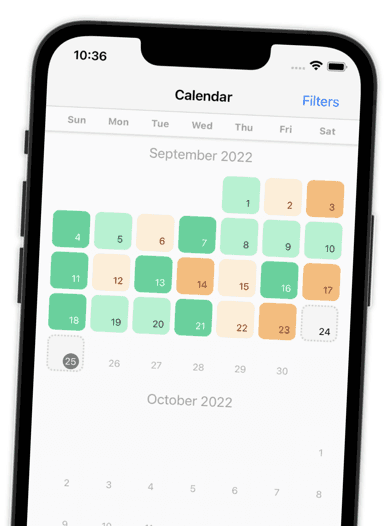
Moodflow and Pixy both turn your days into a year in pixels. Pixy gives you every feature for free, with no Plus tier, on iPhone and Android.


4.9 App Store4.7 Google Play700+ ratings
Side by side
Pixy vs Moodflow at a glance
7 reasons people pick Pixy over Moodflow, based on public store listings.
| Category |  Pixy Pixy |  Moodflow Moodflow |
|---|---|---|
| Price for every featurePublic in-app purchase catalog, US App Store | $0. Free, no subscription | Paid upgrades $3.49 to $14.99 |
| App Store ratingUS App Store | 4.87 ★ | 4.55 ★ |
| Google Play ratingUS Google Play | 4.68 ★ | 2.77 ★ |
| Share of 1 and 2 star reviewsSample of 273 Pixy and 1,842 Moodflow store reviews | 4.0% | 16% |
| Open source | Yes, MIT license | Closed source |
| Download sizeiPhone, App Store | 20 MB | 99 MB |
| Works on older iPhones | iOS 12.4 and newer | iOS 16.4 and newer |
Why Pixy
Why people switch from Moodflow to Pixy
Pixy does one job well: it helps you notice how your days feel. Everything is free, and nothing gets in the way.
Reviews
Loved by people who tried other apps
Pixy is rated 4.9 on the App Store and 4.7 on Google Play. Here is what reviewers say.
Switching
How to switch from Moodflow to Pixy
FAQ
Pixy vs Moodflow: frequently asked questions
Moodflow is a mood tracker with a year in pixels view and a paid Moodflow Plus upgrade. Pixy is a free mood tracker that turns each day into one colored pixel, so a whole year of moods fits on one screen. Every Pixy feature is free, while Moodflow sells paid upgrades $3.49 to $14.99.
Yes, if you want a simple way to track your mood. Pixy covers mood check-ins, emotions, tags, sleep, notes, statistics, reminders, and app lock, all for free. People who switch often mention that Pixy is quicker to fill in and never asks them to upgrade.
Moodflow is free to download with paid upgrades. Its public App Store catalog lists paid upgrades $3.49 to $14.99 (US, September 2026). Pixy costs nothing: no subscription, no in-app purchases, no ads.
Pixy has no direct import from Moodflow. Most people keep an export of their old Moodflow history and start fresh in Pixy. Your pixel calendar fills up fast, and you can export a Pixy backup file at any time.
Yes, both show your mood as one colored square per day. In Pixy, the year view, statistics, emotions, and tags are all free. There is no Plus tier to unlock.
Yes. Pixy is free to download and every feature is free to use. There is no subscription, no in-app purchase, and no ads.
Your entries stay on your phone. Pixy needs no account and no sign-up. You can lock the app with a passcode or biometrics and export a backup file at any time.
Yes. Pixy is on the App Store for iPhone and on Google Play for Android.
A year in pixels is a calendar where each day is one small square, colored by your mood. After a few weeks you can see good and bad stretches at a glance. Pixy builds it for you as you log.
Yes. The code of the Pixy app is public on GitHub under the MIT license, so anyone can check how it works and how it handles data.
Many people use Pixy to show their therapist or psychiatrist how their mood changed between sessions. Pixy is a self-tracking tool, not a medical device, and does not replace professional care.

Ready to switch from Moodflow?
Free on iPhone and Android. No ads, no subscription, no account.
4.9 App Store4.7 Google Play700+ ratings
More comparisons
Compare Pixy with other apps
 Moodistory alternative
 Moody alternative
 EMMO alternative
 How We Feel alternative
 Pixels alternative
 Daylio alternative
 DailyBean alternative
 Moodnotes alternative
 Bearable alternative
 eMoods alternative
 MindDoc alternative
 Clarity alternative
Moodflow is a trademark of Web Free IO. Pixy is not affiliated with Moodflow. Facts about Moodflow come from its public store listings and reviews, checked on September 29, 2026. Found something out of date? Tell us.