Pixy
Free printables

Free Mood Tracker Printables (PDF)

Six mood tracker templates to print today. Color a monthly mood calendar, fill a Year in Pixels, chart your week, or keep a daily mood journal. Choose Pixy colors or black line art with faces. Every sheet comes as A4 and US Letter PDF.

  • 6 templates
  • 2 styles: colors or faces
  • A4 and US Letter
  • Free, no email, no sign-up
  • Sharp vector PDF
Choose your style

Download all 6

See all printables
Choose your style

The color key is printed in Pixy's mood colors. Best on a color printer.

Preview of the Monthly mood tracker printable, Pixy colors style

Mood calendar · Monthly mood chart

Monthly mood tracker

An undated month calendar. Color one square per day, then review the month at the bottom.

Best for: Your first mood tracker. One page shows the whole month.

How to use it

  1. 1Write the month and the dates into the squares.
  2. 2Each evening, color the day in the color of your mood.
  3. 3At the end of the month, count the days per mood next to the key.
  4. 4Fill in your best day, your hardest day, and what helped.

The sheet is undated, so it fits any month of any year. Print 12 for a full year.
Preview of the Year in Pixels template printable, Pixy colors style

Year in Pixels printable · Yearly mood tracker

Year in Pixels template

A whole year on one page: 12 months by 31 days, one small square per day.

Best for: Seeing the big picture. Seasons, busy months, and good stretches show up as color.

How to use it

  1. 1Write the year at the top.
  2. 2Pick 7 colors and fill in the mood key.
  3. 3Every night, color the square for today.
  4. 4Use the notes to remember what happened in a month.

Start on any day. You do not have to wait for January 1. Hatched squares are days that do not exist.

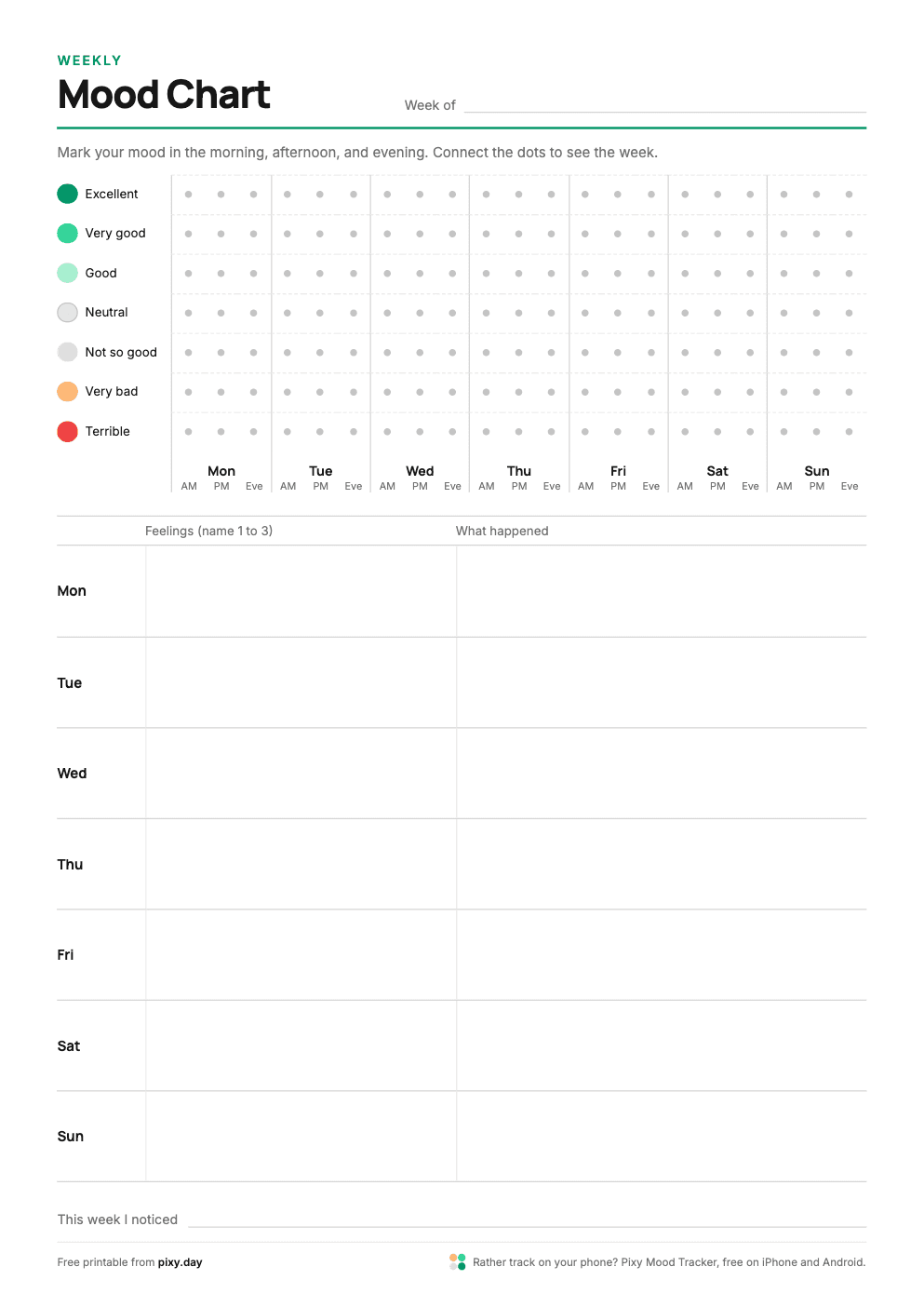
Preview of the Weekly mood chart printable, Pixy colors style

Mood chart printable · Mood swings chart

Weekly mood chart

A line chart for one week. Mark your mood in the morning, afternoon, and evening, then connect the dots.

Best for: Seeing how your mood moves within a day, not only from day to day.

How to use it

  1. 1Write the start date next to "Week of".
  2. 2Three times a day, put a dot on the row that matches your mood.
  3. 3Connect the dots with a line.
  4. 4Name 1 to 3 feelings per day and note what happened.

Miss a check-in? Leave the dot out. A gap in the line is still useful data.

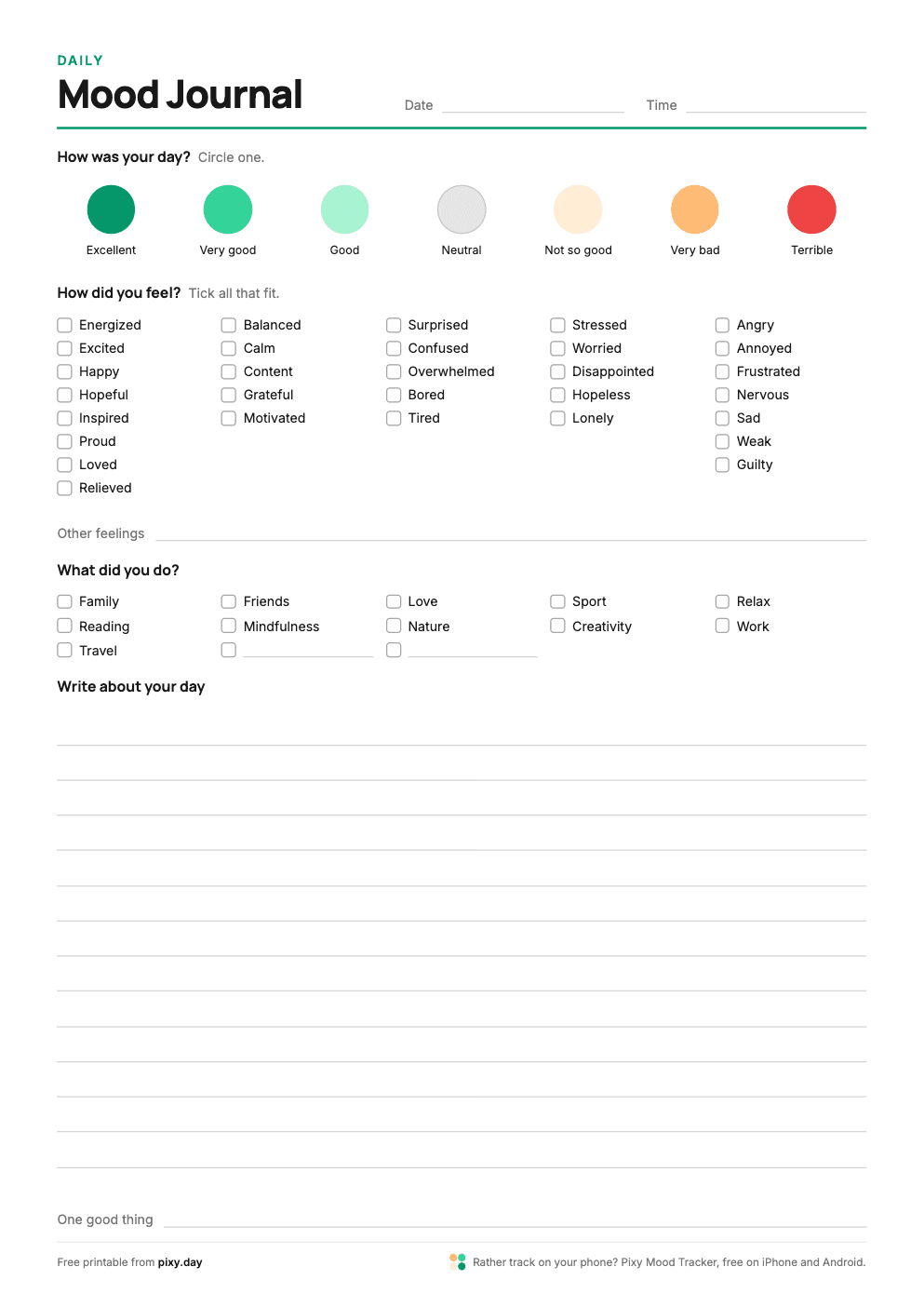
Preview of the Daily mood journal printable, Pixy colors style

Daily mood tracker · Mood diary worksheet

Daily mood journal

One page per day with the same steps as a check-in in the Pixy app: mood, feelings, activities, and a note.

Best for: Days you want to reflect, not only rate. Good for a mood diary in a binder.

How to use it

  1. 1Write the date and time at the top.
  2. 2Circle the mood that fits your day.
  3. 3Tick the feelings you had. Write in any that are missing.
  4. 4Tick what you did, then write a few lines about your day.

The 30 feelings on the sheet are the basic set from the Pixy app. The emotions list has 42 more.

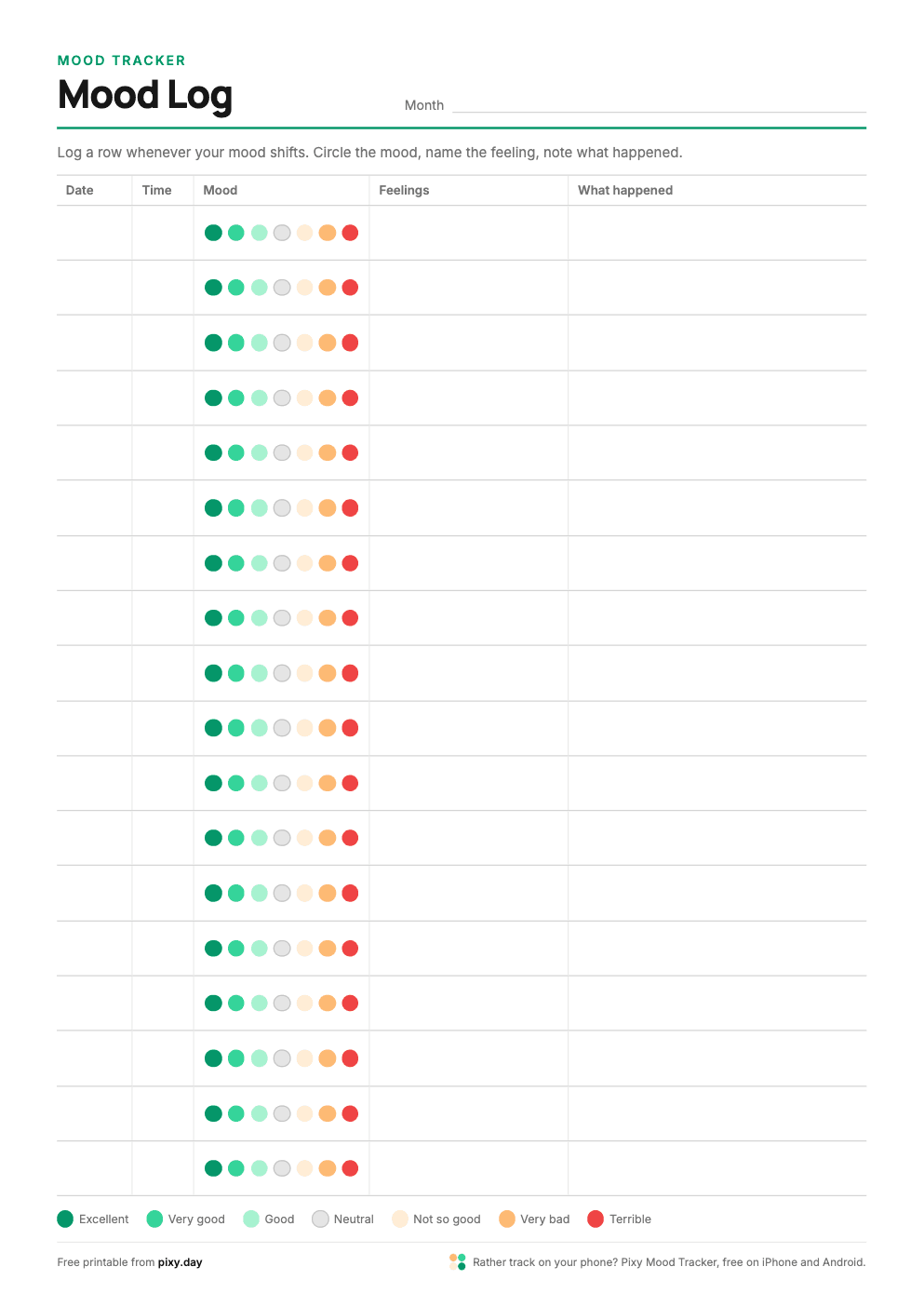
Preview of the Mood log printable, Pixy colors style

Mood log PDF · Mood diary template

Mood log

A table with one row per check-in: date, time, mood, feelings, and what happened.

Best for: Logging several times a day, or only when your mood shifts.

How to use it

  1. 1Write the month at the top.
  2. 2Add a row whenever you want to log: date and time first.
  3. 3Circle one of the 7 mood dots.
  4. 4Name the feeling and note what happened just before.

Read the "What happened" column at the end of the week. Repeating events are easy to spot.

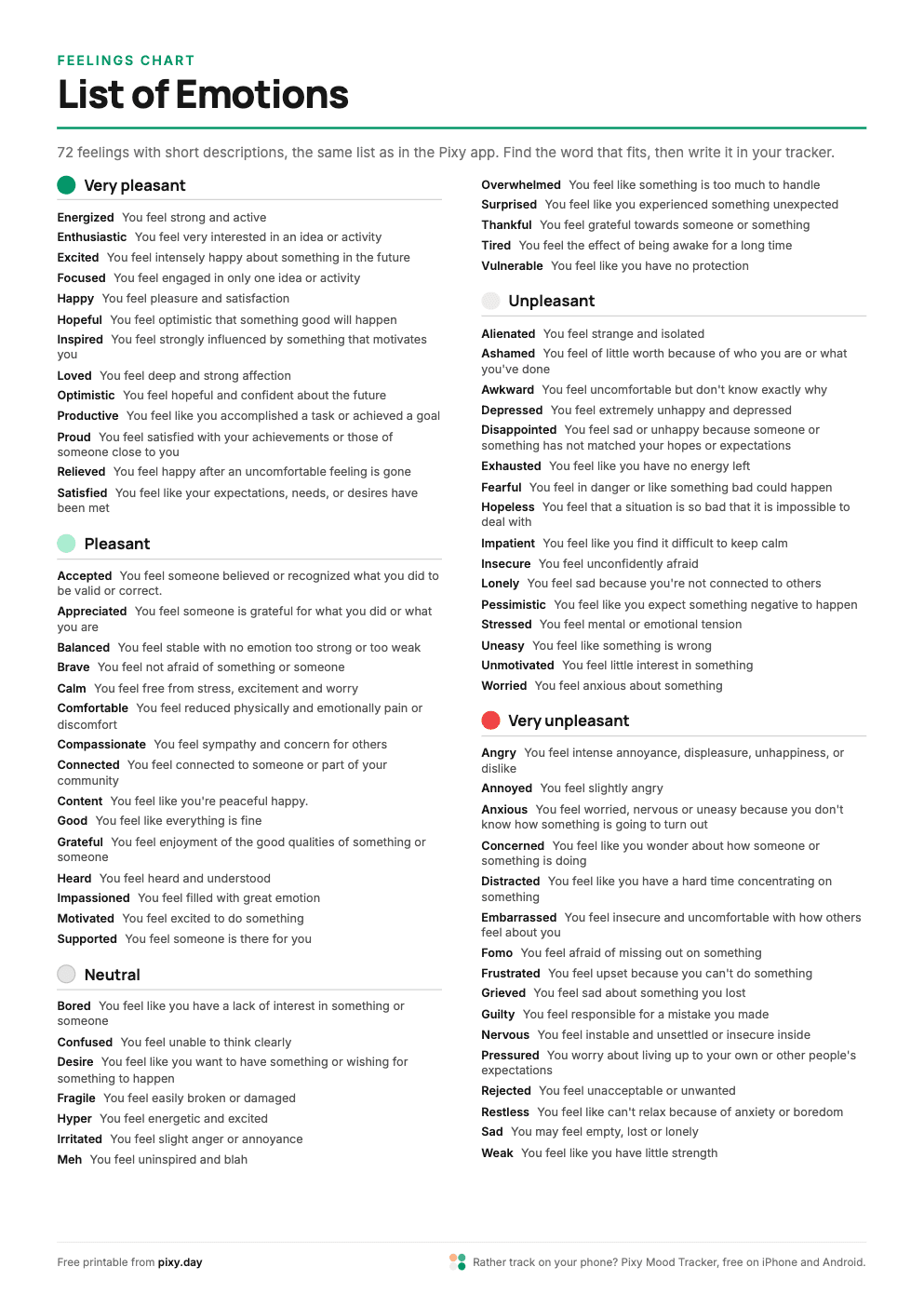
Preview of the List of emotions printable, Pixy colors style

Feelings chart · List of moods for mood tracker

List of emotions

72 emotions with short descriptions, grouped from very pleasant to very unpleasant. The same list as in the Pixy app.

Best for: Finding the right word. Keep it next to your tracker or tape it into your journal.

How to use it

  1. 1Find the group that matches how you feel overall.
  2. 2Read the descriptions and pick the word that fits best.
  3. 3Write it in your tracker, journal, or mood log.

Naming a feeling precisely makes your notes easier to understand when you read them later.

Color key ideas

Pick 7 colors before you start, then keep them for the whole month or year. The first five scales come from the Pixy app.

ExcellentTerrible

Pixy default

Green for good days, red for hard days, light gray in the middle.

ExcellentTerrible

Classic traffic light

Strong greens, yellow, and reds. Bold and easy to read from far away.

ExcellentTerrible

Purple to orange

No red and green. Works well if you see those two colors poorly.

ExcellentTerrible

Teal to brown

Calm, earthy tones that look good in a bullet journal.

ExcellentTerrible

Soft green to red

Pastel middle steps. Easy to reach with colored pencils.

ExcellentTerrible

One color, seven shades

Only one marker? Press harder for better days, or the other way round.

Tips for your key

  • Test every pencil in the key first. Colors on paper look different than in the box.
  • Keep the same key all year. Changing it makes months hard to compare.
  • Keep the middle step light, so strong days stand out.
  • Mixed day? Color the square in two halves.

What else can you track?

Mood is the classic. Any sheet works for other things too. Print a second Year in Pixels for one of these:

Energy
From exhausted to full of energy.
Sleep quality
How rested you felt in the morning.
Stress
From relaxed to overwhelmed.
Anxiety
How worried or tense you felt.
Social time
Alone, with one person, or with many.
Movement
None, a walk, or a workout.
Screen time
Low, medium, or high.
Gratitude
One color per day you wrote one thing down.

How to keep a paper mood tracker

A mood tracker works when it takes less than a minute. Five steps:

  1. 1

    Pick one time

    Track at the same time each day. Right before bed works for most people.

  2. 2

    Keep it visible

    Put the sheet and your pencils where you see them, next to the bed or desk.

  3. 3

    Rate first, think later

    Color the square in 10 seconds. Your first answer is usually the right one.

  4. 4

    Add one word

    A feeling or an event. It explains the color when you look back.

  5. 5

    Look back every month

    Count the colors and read your notes. Patterns show up after a few weeks.

Bullet journal sizes

  • A4 sheet in an A5 notebook: print at 71%.
  • US Letter sheet in a half-letter notebook (5.5 x 8.5 in): print at 65%.
  • Trim the margins and glue the page in.

Pixy Mood Tracker

Rather not color by hand? Pixy does this on your phone

Pixy is the same idea as these sheets, in a free app for iPhone and Android. Rate your day on a 7-step color scale and Pixy colors the calendar for you.

09:41
Today, 09:41
How was your day?
Statistics
Mood
Your mood appears with 78% to be mostly positive.
Statistics
Year in Pixels
On paperIn Pixy
Color a monthly calendarEach day becomes a colored square in the calendar
Fill a Year in PixelsYour Year in Pixels is part of the yearly report
Look up a feelingPick from 72 emotions, each with a short description
Check in several times a dayLog as many entries per day as you like
Count the colors each monthA monthly report with mood chart, peaks, and most felt emotions
Remember to trackA daily reminder at a time you choose

Free, no ads, no account. Your entries stay on your phone.

More about Year in Pixels

Reviews

Loved by People Who Tried Other Apps

4.9
App Store
4.7
Google Play

FAQ

Questions about the printables

Track your mood without pencils

On iPhone and Android. No ads, no account, your data on your phone.

Download on the App StoreGet it on Google Play
4.9 App Store4.7 Google Play700+ ratings