
 vs
vs
Pixy vs Apple Journal: mood tracking on iPhone and Android
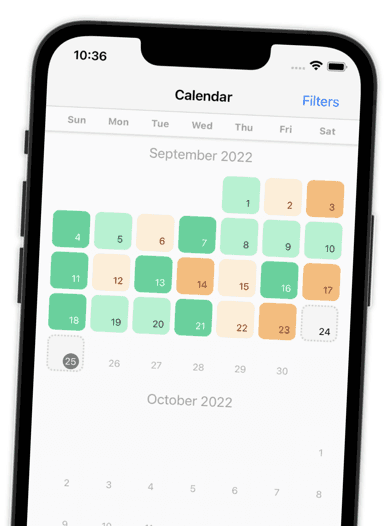
Apple Journal is free but iPhone only and made for writing. Pixy is made for mood: a year in pixels, emotions, and statistics, on iPhone and Android.


Side by side
Pixy vs Apple Journal at a glance
6 reasons people pick Pixy over Apple Journal, based on public store listings.
| Category |  Pixy Pixy |  Apple Journal Apple Journal |
|---|---|---|
| App Store ratingUS App Store | 4.87 ★ | 4.78 ★ |
| Share of 1 and 2 star reviewsSample of 273 Pixy and 500 Apple Journal store reviews | 4.0% | 10% |
| Platforms | iPhone and Android | iPhone only |
| Year in pixels calendar | Built in | Not in store listing |
| Open source | Yes, MIT license | Closed source |
| Works on older iPhones | iOS 12.4 and newer | iOS 17.2 and newer |
Why Pixy
Why people switch from Apple Journal to Pixy
Pixy does one job well: it helps you notice how your days feel. Everything is free, and nothing gets in the way.
Reviews
Loved by people who tried other apps
Pixy is rated 4.9 on the App Store and 4.7 on Google Play. Here is what reviewers say.
Switching
How to switch from Apple Journal to Pixy
FAQ
Pixy vs Apple Journal: frequently asked questions

Ready to switch from Apple Journal?
Free on iPhone and Android. No ads, no subscription, no account.
More comparisons
Compare Pixy with other apps
 Google Journal alternative
 Pixels alternative
 Daylio alternative
 DailyBean alternative
 Moodflow alternative
 Moodnotes alternative
 Moodistory alternative
 Moody alternative
 EMMO alternative
 How We Feel alternative
 Bearable alternative
 eMoods alternative
Apple Journal is a trademark of Apple. Pixy is not affiliated with Apple Journal. Facts about Apple Journal come from its public store listings and reviews, checked on September 29, 2026. Found something out of date? Tell us.