Pixy
Pixy app iconvsGoogle Journal app icon
Google Journal alternative

Pixy vs Google Journal: a mood journal for any phone

Google Journal only runs on Pixel phones. Pixy is a mood journal for any Android phone, including Samsung, and for iPhone.

Last checked . Facts from the US App Store and Google Play listings. Pixy facts from the app source.

Download on the App StoreGet it on Google Play
4.9 App Store4.7 Google Play700+ ratings
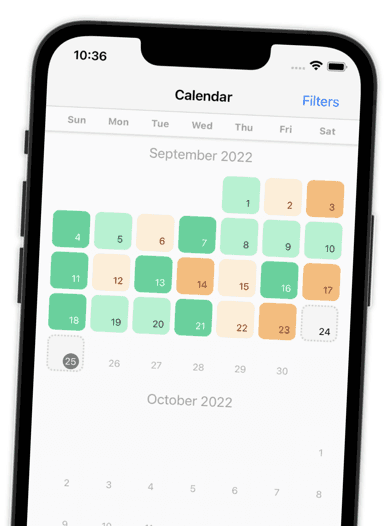
Year in pixels calendar
Every day is one colored square
Google Journal: Not in store listing
Custom tags
Your own activities, people, places
Google Journal: Not in store listing
Photos
Google Journal has this
Pixy: No

Side by side

Pixy vs Google Journal at a glance

How Pixy and Google Journal compare on features, platforms, and privacy, based on public store listings.

Checked on September 29, 2026. Google Journal facts come from its US App Store and Google Play listings; "Not in store listing" means Google Journal does not advertise it. Pixy facts come from the app source code. Ratings and prices are from the US stores.
CategoryPixyGoogle Journal
NotesAdd a note to any entryYes, per store listing
Mood statisticsWeekly, monthly, and yearlyYes, per store listing
RemindersDaily check-in reminderYes, per store listing
App lockFace ID or Private Space lockYes, per store listing
Year in pixels calendarEvery day is one colored squareNot in store listing
Custom tagsYour own activities, people, placesNot in store listing
Home screen widgetiPhone widgets: 4 weeks, month, yearNot in store listing
Export your dataExport JSON or CSV, re-import JSONNot in store listing
Data stays on your phoneOn your phone, no accountNot in store listing
PhotosNoYes, per store listing
Voice notesNoYes, per store listing
Writing promptsNoYes, per store listing
Goals and streaksNoYes, per store listing
Automatic backupNoYes, per store listing
Device syncNoYes, per store listing
Health dataNoYes, per store listing
AI featuresNoYes, per store listing
PlatformsiPhone and AndroidPixel phones only
PriceFree. No subscription, no ads.Free
AdsNo adsNo ads
Open sourceYes, MIT licenseClosed source
App Store ratingUS App Store, checked September 29, 20264.87 ★ (135)Not on the App Store
Google Play ratingUS Google Play, checked September 29, 20264.68 ★ (569)3.37 ★ (953)
When Google Journal is the better pick
  • You want to record voice notes.
  • You want your entries on several devices.
  • You want sleep or exercise data next to your mood.
  • The app is free, with no paid plans.
When Pixy is the better pick
  • You want your whole year as colored pixels on one screen.
  • You want your own tags for activities, people, and places.
  • You want your pixels in a widget on your iPhone Home Screen.
  • You want to export your entries as JSON or CSV and import them again.

Is Pixy free?

Yes. Pixy is free on iPhone and Android, with no subscription, no ads, and no account. The source code is public under the MIT license.

Why Pixy

Why people switch from Google Journal to Pixy

Pixy does one job well: it helps you notice how your days feel. Quick to fill in, clear to read, and private by default.

Your year in pixels
Every day becomes one colored square. A full year of moods fits on one screen, so patterns jump out.
Log a day in seconds
Pick a color and you are done. Add emotions, people, tags, or a note only when you want to. You choose which steps show up.
Name what you feel
Choose from a long list of emotions, each with a short description. Log as many entries per day as you like.
See who you spend your days with
Add the people you were with to an entry. Pick them from a grid of faces, or import them from your contacts.
Patterns you can act on
Each check-in ends with a summary of your day and your week in pixels. Monthly and yearly reports show when your mood peaks and which tags come up most.
A calm minute when you need it
Feeling anxious? After your check-in, Pixy offers short guided exercises: slow breathing, a worry check, or a body scan.
Your pixels on your Home Screen
iPhone widgets show your last 4 weeks, this month, or your whole year. Pick your mood colors and one of 9 app icons.
Private by default
No account and no sign-up. Entries stay on your phone. Export to JSON or CSV, or delete your data any time.
Open source, no ads
The code is public on GitHub under the MIT license, so anyone can check it. And nothing interrupts you: Pixy shows no ads.

Reviews

Loved by People Who Tried Other Apps

Pixy is rated 4.9 on the App Store and 4.7 on Google Play. Here is what reviewers say.

yell0gsVerified App Store review
Jun 2025
“Finally, a mood app that isn’t overwhelming! The app design is visually pleasing, it’s simple and not crowded or too busy. … You can choose what things you track.”
Angelina A.Verified Google Play review
Nov 2024
“Out of all the mood tracker apps I’ve tried, Pixy is by far the best. I love the simple and easy to use design, it also has a very neat layout and aesthetic.”
Nix C.Verified Google Play review
Aug 2024
“Plenty of emotions to choose from and can select multiple options. Color coded so you can easily spot patterns throughout the weeks and months. Developer cares and it shows.”
yell0gsVerified App Store review
Jun 2025
“Finally, a mood app that isn’t overwhelming! The app design is visually pleasing, it’s simple and not crowded or too busy. … You can choose what things you track.”
Angelina A.Verified Google Play review
Nov 2024
“Out of all the mood tracker apps I’ve tried, Pixy is by far the best. I love the simple and easy to use design, it also has a very neat layout and aesthetic.”
Nix C.Verified Google Play review
Aug 2024
“Plenty of emotions to choose from and can select multiple options. Color coded so you can easily spot patterns throughout the weeks and months. Developer cares and it shows.”
yell0gsVerified App Store review
Jun 2025
“Finally, a mood app that isn’t overwhelming! The app design is visually pleasing, it’s simple and not crowded or too busy. … You can choose what things you track.”
Angelina A.Verified Google Play review
Nov 2024
“Out of all the mood tracker apps I’ve tried, Pixy is by far the best. I love the simple and easy to use design, it also has a very neat layout and aesthetic.”
Sarah G.Verified Google Play review
Jun 2024
“Absolutely superb app with the right balance of functionality and simplicity. I tried a couple of other tracker apps but they were too complex and time consuming to fill in. Pixy’s biggest strength is that it can be used quickly.”
Indigo S.Verified Google Play review
Aug 2024
“Tested a bunch of tracker apps. This UX is perfect and intuitive. And customizable!”
Alan V.Verified Google Play review
Jan 2023
“It’s minimal, feature-rich and very user friendly. This one genuinely deserves way more downloads.”
Sarah G.Verified Google Play review
Jun 2024
“Absolutely superb app with the right balance of functionality and simplicity. I tried a couple of other tracker apps but they were too complex and time consuming to fill in. Pixy’s biggest strength is that it can be used quickly.”
Indigo S.Verified Google Play review
Aug 2024
“Tested a bunch of tracker apps. This UX is perfect and intuitive. And customizable!”
Alan V.Verified Google Play review
Jan 2023
“It’s minimal, feature-rich and very user friendly. This one genuinely deserves way more downloads.”
Sarah G.Verified Google Play review
Jun 2024
“Absolutely superb app with the right balance of functionality and simplicity. I tried a couple of other tracker apps but they were too complex and time consuming to fill in. Pixy’s biggest strength is that it can be used quickly.”
Indigo S.Verified Google Play review
Aug 2024
“Tested a bunch of tracker apps. This UX is perfect and intuitive. And customizable!”

Switching

How to switch from Google Journal to Pixy

  1. Step 1
    Download Pixy
    Get Pixy from the App Store or Google Play. No account, no sign-up.
  2. Step 2
    Keep your Google Journal history
    Export your old entries from Google Journal before you leave, so nothing gets lost.
  3. Step 3
    Log today in seconds
    Tap a color for today. Your first pixel is in, and your year starts to take shape.

FAQ

Pixy vs Google Journal: frequently asked questions

Ready to switch from Google Journal?

On iPhone and Android. No ads, no account, your data on your phone.

Download on the App StoreGet it on Google Play
4.9 App Store4.7 Google Play700+ ratings

More comparisons

Compare Pixy with other apps

Google Journal is a trademark of Google LLC. Pixy is not affiliated with Google Journal. Facts about Google Journal come from its public store listings and reviews, checked on September 29, 2026. Facts about Pixy come from the app source code. Found something out of date? Tell us